Screen Click and Scratch Life Tester is a precision reliability testing instrument specially designed for the consumer electronics industry. It is widely used in the quality inspection and R&D verification of touch screens for smartphones, tablets, smart terminals, and other electronic devices.Based on precise servo control technology and mechanical transmission systems, the equipment can simulate daily operations performed by human fingers and styluses, including clicking, scratching, and sliding movements. Under controlled parameters such as applied pressure, testing speed, movement trajectory, and cycle count, it performs repeated durability tests on various types of touch screens, including capacitive screens and resistive screens.The instrument can accurately evaluate the scratch resistance, click durability, and wear resistance of screen surfaces, while also verifying touch sensitivity, display performance, and structural integrity after long-term use. It provides scientific and reliable data support for product quality control, manufacturing process optimization, and compliance testing.
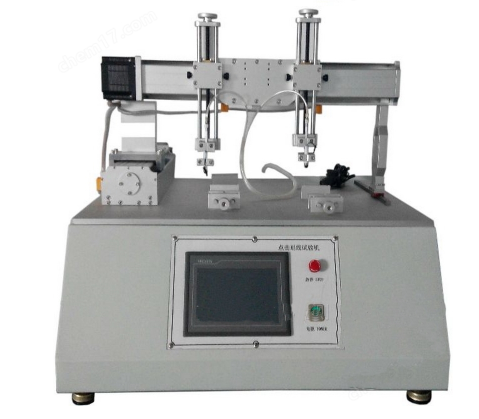
The technical core of the Screen Click and Scratch Life Tester is based on electromechanical integration and motion control technology. The equipment mainly consists of a motion control system (PLC or embedded microcomputer), actuator system (servo motor, stepper motor, or pneumatic cylinder driven X/Y/Z axes), test probe, and loading system (weights or pneumatic pressure control mechanism).
During the testing process, the clicking test mode uses a pneumatic cylinder or motor-driven probe to apply a preset normal load vertically onto the touchscreen surface and perform repeated up-and-down movements.
In the scratch test mode, the probe is driven to move across the screen surface along programmed trajectories on the X-Y plane, such as straight lines, rectangles, circles, diagonal lines, and other customized paths.
Through a high-precision motion controller, the system can monitor and adjust key parameters in real time, including:
Applied pressure
Movement speed
Test stroke
Number of test cycles
At the same time, the equipment monitors the touch response performance during testing to simulate the wear mechanisms encountered in actual daily use scenarios, such as finger clicking, stylus operation, and repeated sliding friction.
By accurately reproducing long-term usage conditions, the Screen Click and Scratch Life Tester provides reliable evaluation data for analyzing the durability, wear resistance, and functional stability of touch screen products.
The Screen Click and Scratch Life Tester integrates dual testing modes and multi-trajectory testing capabilities. It supports independent or combined testing modes, including clicking tests and scratch tests. Users can flexibly program various movement paths, including straight lines, rectangles, circles, grids, diagonal lines, and customized complex spline curves, enabling comprehensive and accurate simulation of touchscreen wear conditions during daily operations such as unlocking, gaming, typing, and other interactive applications.
At the same time, the tester provides precise force and speed control. The applied normal load is typically achieved through a combination of precision weights or a high-accuracy pneumatic cylinder system, allowing multi-level pressure adjustment. The testing speed and stroke are precisely driven and controlled through high-performance servo motors with closed-loop feedback control, ensuring constant load application and high repeatability of test conditions throughout the entire testing process.
In addition, the equipment is equipped with an intelligent management and data output system. It features a built-in 6-digit or 8-digit electronic counter for accurate recording of test cycles, as well as practical functions including:
Automatic shutdown after completing the preset test cycles
Data memory after unexpected power failure
Real-time fault alarm indication
Some advanced models can also provide real-time output of force-time curves and other test data. Through communication interfaces, the equipment can be connected to upper-level computer software for data acquisition, storage, and in-depth analysis, providing comprehensive quantitative evaluation data for assessing touchscreen durability and long-term reliability.
1. Test Preparation Before Testing
Before starting the test, conduct a comprehensive inspection of the equipment to ensure that the power supply, electrical connections, pneumatic cylinders, and servo transmission mechanisms are functioning properly. Confirm that the test probe is intact without wear and that all required weights are available and in good condition.
Then prepare the sample:
Clean the screen surface with anhydrous ethanol to remove dust, oil stains, and impurities.
Place the sample in a standard test environment with a temperature of 23℃ ± 2℃ and relative humidity of 50%RH ± 5% for 24 hours of conditioning to ensure stable sample conditions.
Fix the sample securely onto the dedicated fixture and tighten the locking mechanism to prevent displacement or vibration during testing.
2. Parameter Setting
Connect the equipment to the power supply and start the control system. According to the applicable testing standards and product requirements, select the appropriate test mode, including:
Clicking test mode
Scratch test mode
Combined click and scratch test mode
Set the key testing parameters accurately, including:
Test load: Select standard weights ranging from 10 g to 500 g. For general consumer electronic screens, a load of 50–200 g is commonly selected to simulate human finger pressing force.
Testing frequency: Set the test frequency within the range of 10–60 cycles/min.
Test positions
Sliding trajectories
Total number of test cycles
After confirming that all parameters are correct, save the settings and prepare for testing.
3. Formal Testing Process
After completing parameter verification, press the start button and the equipment will automatically enter the testing mode.
During the test, the operator should continuously monitor the equipment operation status, including:
Movement condition of the test probe
Stability of load application
Smoothness of the motion mechanism
If abnormal conditions occur, such as:
Unusual noise
Position deviation
Mechanical jamming
the equipment should be stopped immediately for inspection and troubleshooting.
During the testing process, the equipment automatically records test data without requiring manual intervention.
4. Test Completion and Follow-up Processing
After reaching the preset number of test cycles, the equipment will automatically stop.
The operator should then:
Save the test data.
Carefully remove the tested sample.
Inspect the screen surface condition.
Record test results, including:
Scratch marks
Surface wear
Touch function failure
Other abnormalities
After completing the evaluation, organize the results and prepare the test report.
Finally:
Turn off the equipment power supply.
Clean the testing platform.
Wipe the test probe.
Perform routine cleaning and maintenance procedures to ensure equipment accuracy and extend service life.
Proper operation of the Screen Click and Scratch Life Tester ensures reliable durability evaluation of touch screens and provides accurate data support for product development, quality control, and reliability improvement.
1. Operating Environment Requirements
The equipment should be installed in a dry, well-ventilated indoor environment free from dust and corrosive gases. Avoid exposure to high temperatures, excessive humidity, and direct sunlight. These conditions may cause moisture oxidation of precision components or malfunction of sensor modules, which can negatively affect testing accuracy.
2. Equipment Operating Guidelines
Do not disassemble fixtures or touch transmission components while the equipment is running. Unauthorized modification of system parameters is strictly prohibited.
Test weights should be handled carefully to ensure that the load is applied vertically and evenly. Overload testing is strictly prohibited to prevent damage to the test probe and transmission mechanism.
The test probe is a precision consumable component. If wear, deformation, or damage occurs, it should be replaced promptly to prevent sample damage or inaccurate test results caused by measurement deviation.
3. Sample Testing Requirements
Samples must be firmly fixed and placed evenly on the fixture. Avoid sample tilting or loosening, as these issues may cause trajectory deviation and uneven force distribution, affecting test accuracy.
For samples from the same batch, identical testing parameters should be maintained to ensure that test results are comparable and reliable.
4. Daily Equipment Maintenance
After each test, clean the equipment platform and test probe promptly. Regularly inspect the operating condition of:
Electrical wiring
Pneumatic cylinders
Servo motors
The load accuracy and motion trajectory accuracy should also be calibrated periodically to maintain testing reliability.
For equipment that remains unused for an extended period:
Disconnect the power supply.
Protect the equipment from dust.
Perform an unloaded operation test once a month.
These measures help maintain stable equipment performance and extend service life.
5. Safety Requirements
Operators must receive professional training before operating the equipment.
If equipment failure occurs, unauthorized disassembly or repair is strictly prohibited. Professional technicians should be contacted for inspection and maintenance to prevent safety hazards or further equipment damage.
The Screen Click and Scratch Life Tester provides advantages including high precision, excellent stability, and customizable testing parameters, enabling accurate simulation of various real-world touchscreen usage conditions while eliminating the errors and inefficiency associated with manual testing methods.Through standardized and automated durability testing, the equipment can quickly identify performance defects related to:Wear resistance,Scratch resistance,Click durability.It helps manufacturers optimize screen materials, bonding processes, and product designs while effectively reducing after-sales failures and maintenance costs.Meanwhile, the test data generated by the equipment can serve as a key reference for product quality verification and performance improvement. By enhancing the reliability and market competitiveness of electronic terminal products, the Screen Click and Scratch Life Tester has become an essential testing instrument in touchscreen R&D, mass production inspection, and quality control processes.


